Next Edition documentation
Next Edition is a magazine and blog child theme for Divi 5. It adds post formats, review boxes, visitor star ratings, featured posts, category and author colours, mega menus and fourteen Divi 5 modules, and installs ready-made Theme Builder templates for every page of a publication. See it on the live demo.
Requirements and installation
| Requirement | Minimum | Tested up to |
|---|---|---|
| WordPress | 6.5 | 7.1 |
| PHP | 7.4 | 8.4 |
| Divi | Divi 5 theme | 5.17 |
Next Edition is a child theme of Divi, so the Divi theme must be installed (it need not be active). It is Divi 5 only.
- In Appearance > Themes > Add New > Upload Theme, upload the Next Edition zip.
- Activate Next Edition.
- Open Appearance > Next Edition and install the templates (below).
Your Divi settings, Theme Builder templates and pages stay as they are. Next Edition adds to them; it changes nothing you already have unless you ask it to.
Templates
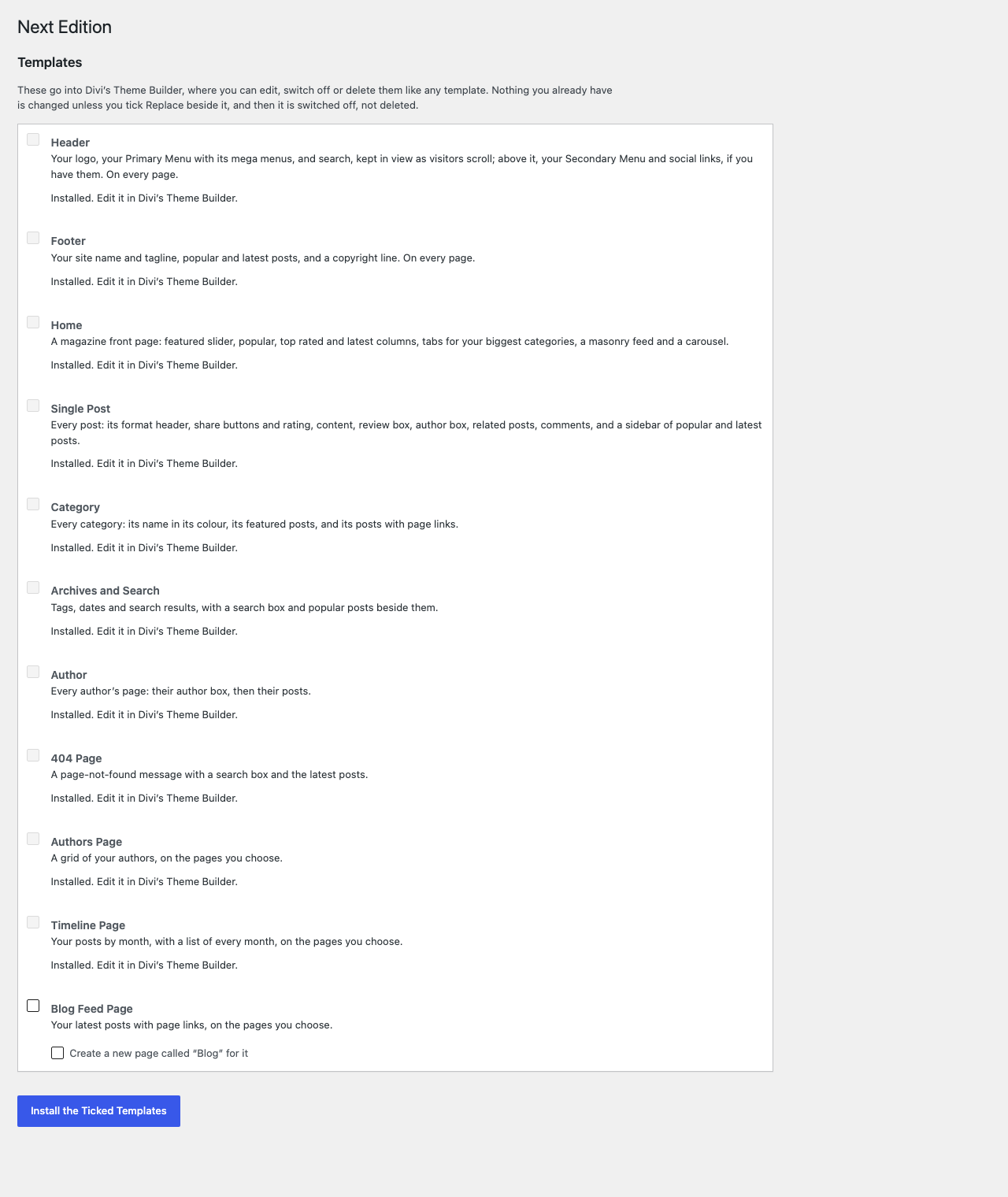
Appearance > Next Edition lists eleven Theme Builder templates. Tick the ones you want and click Install the Ticked Templates. They go into Divi > Theme Builder, where you edit, switch off or delete them like any template.
| Template | Where it applies | What it shows |
|---|---|---|
| Header | Every page | Your logo, your Primary Menu with its mega menus, and search, kept in view as visitors scroll; above it, your Secondary Menu and social links, if you have them |
| Footer | Every page | Your site name and tagline, popular and latest posts, a copyright line |
| Home | The home page | Featured slider; Popular, Top Rated and Latest columns; tabs for your biggest categories; a masonry feed; a carousel |
| Single Post | Every post | The format header, share buttons and rating, the content, review box, author box, related posts, comments, and a sidebar |
| Category | Every category | Its name in its colour, its featured posts, and its posts with page links |
| Archives and Search | Tags, dates, search results | The posts, with a search box and popular posts beside them |
| Author | Every author's page | Their author box, then their posts |
| 404 Page | Pages not found | A message, a search box and the latest posts |
| Authors Page | Pages you choose | A grid of your authors |
| Timeline Page | Pages you choose | Your posts by month, with a list of every month |
| Blog Feed Page | Pages you choose | Your latest posts with page links |
- If you already have templates for the same pages, the screen says which would overlap. Yours are kept unless you tick Replace beside one, and even then yours is switched off, not deleted.
- The last three apply to pages you choose. The screen offers to create a page for each.
- The logo in the Header template is Divi's logo (Divi > Theme Options) or WordPress's site logo; with neither, your site title.
- A template already installed is left as it is. To start one again, delete it in the Theme Builder and install it here.
Writing posts
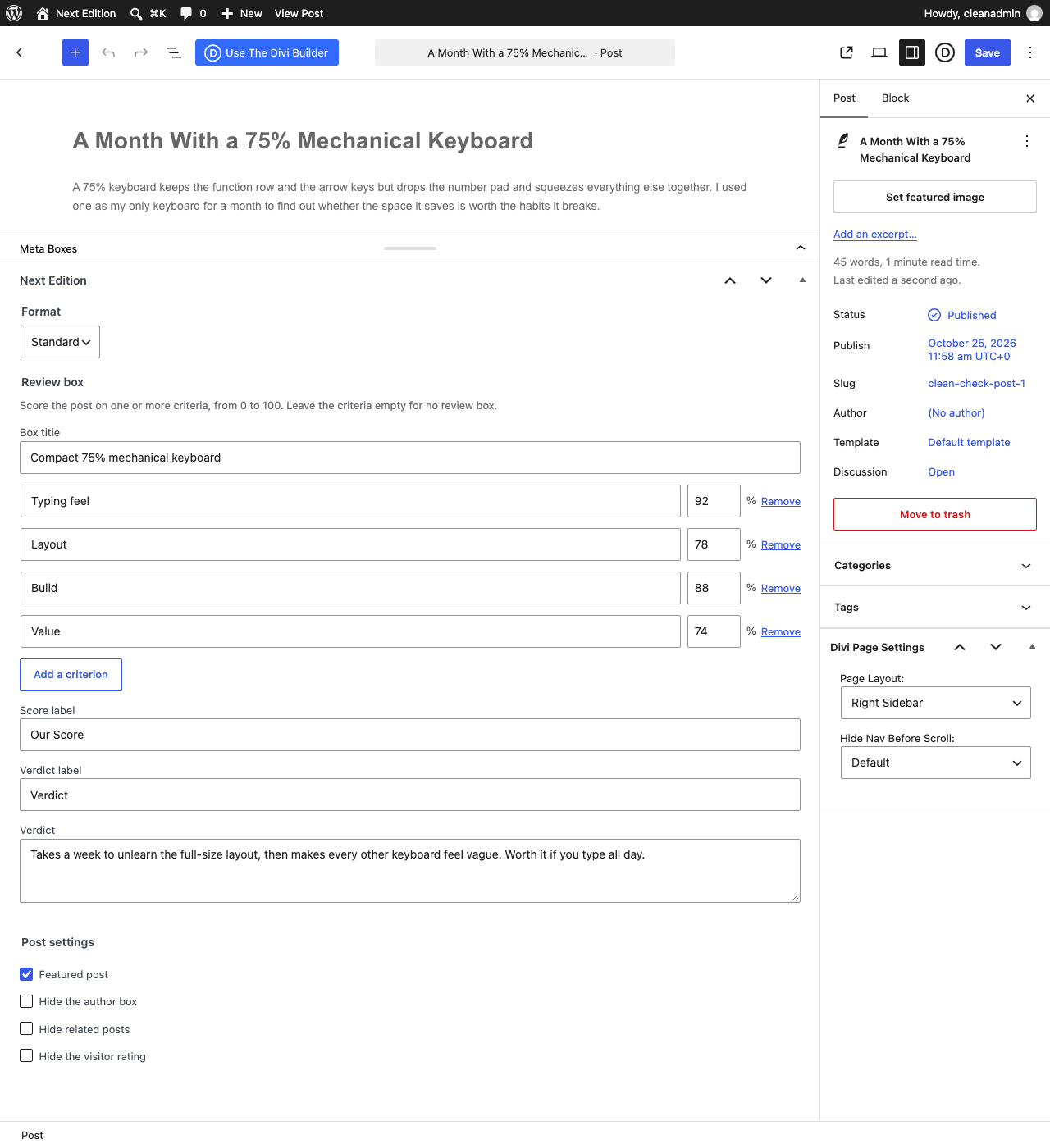
The post editor has a Next Edition box below the content.
Format
Choose how the post opens. The Single Post template shows it at the top, and cards show its icon.
| Format | What you add |
|---|---|
| Standard | Nothing: the featured image is shown |
| Video | A YouTube or Vimeo link, or a video file, with more URLs for other file types of the same video |
| Audio | An audio file, a title, a subtitle and a background colour |
| Gallery | Images, and an autoplay speed if the gallery should move on its own |
| Quote | The quote and its attribution |
| Link | The URL and its title |
A video post without a featured image uses the video's own thumbnail on cards.
Review box
Score the post on one or more criteria, each from 0 to 100. The box shows each criterion as a bar and their average as the score; cards show the score as a bar too. Leave the criteria empty for no review box. The box title, score label, verdict label and verdict are optional.
Post settings
- Featured post puts the post in Featured Posts Sliders and the Featured Only lists.
- Hide the author box, Hide related posts and Hide the visitor rating switch those off on this post.
Star ratings
Visitors rate a post with half-star precision from the Star Rating module, which the Single Post template includes. Each person rates a post once: by their account when they are logged in, otherwise by their IP address. Ratings are stored as WordPress comments of their own type, so they never appear among the comments or count towards a post's comment count.
The stars work on cached pages: the page asks for the live numbers when it loads.
Colours
- Categories: Posts > Categories has a colour for each category, used on its labels, headings and cards throughout the site. A child category with no colour uses its parent's.
- Authors: each user profile has a colour, used on the author's name, author box and on the Authors Page.
Any Divi colour setting can use the post's category colour through dynamic content (below).
Mega menus
In Appearance > Menus, every top-level menu item has a Mega menu setting:
- Columns of this item's sub-items lays its sub-menu out in columns.
- Three posts from this category and Two posts and a list of recent ones, on a category menu item, show that category's latest posts with their images.
The Header template's menu shows them.
Modules
All fourteen are in the Divi builder under Next Edition, show real posts on the builder canvas, and take every Divi Design and Advanced setting.
| Module | What it does |
|---|---|
| Post List | A large first post, then a list |
| Post Feed | Posts as a list or in masonry columns, with page links |
| Featured Posts Slider | Full-width slides with the title over the picture |
| Posts Carousel | Cards in a row that scrolls |
| Tabbed Posts | A tab per category, each a Post List; add Tab children |
| Authors Grid | Your authors, in their colours |
| Post Timeline | Posts by month |
| Ads | Image or code ads; add Ad children |
| Post Format Header | The post's video, audio player, gallery, quote or link |
| Review Box | The post's review |
| Star Rating | The visitor rating, and voting |
| Author Box | The author, their bio and links |
| Related Posts | Posts from the same categories |
| Share Buttons | Share links for the main networks, email and copy link |
The listing modules choose what to show from Latest, Most Comments, Top Rated, Featured Only, Latest Reviews and Top Scored, in any categories, and the Post Feed also from This Page's Posts (an archive's, a search's). Most Comments counts real comments only, not ratings.
No post twice
On a page, a listing module skips the posts shown by the modules above it, so the same post never fills the slider and every column. Each module has a switch to turn this off. On a small blog with too few posts to fill the page, the lower modules repeat some rather than stand empty.
Top Rated before anyone has rated a post shows the latest posts instead, headed Latest; the Post List's Show Latest When None Match switch controls it, as the slider's does for Featured.
Dynamic content
Divi's dynamic content gains six fields, which also work inside Divi's loops: Review Score, Star Rating, Star Rating as Stars, Star Rating Votes, Post Format and Category Colour (in colour settings).
Privacy
Next Edition suggests a paragraph for your privacy policy under Settings > Privacy > Policy Guide. In short:
- Star ratings store the rating with the voter's IP address, or their account when logged in, so each person rates a post once.
- Video posts load their player, and a card may load its thumbnail, from the site hosting the video, such as YouTube.
Next Edition sets no cookies of its own and sends nothing to DiviRise.
Troubleshooting
A header or footer of my own looks unstyled
A Theme Builder header or footer built with Divi 4 loses its colours and spacing on pages built entirely in Divi 5, as Next Edition's are. Convert it to Divi 5 under Divi > Divi 5 Migrator, or open it in the Theme Builder and save it.
The home page repeats posts
It does that when the site has too few posts to fill every module showing each post once. It stops as you publish more. To leave modules short instead, use the filter below.
For developers
| Filter | What it changes |
|---|---|
divirise_next_edition_post_query_args | The WP_Query arguments of every listing module |
divirise_next_edition_repeat_shown_posts | Whether a module short of posts repeats shown ones (true) |
divirise_next_edition_author_box_default | Whether posts show the author box unless switched off |
divirise_next_edition_related_posts_default | Whether posts show related posts unless switched off |
divirise_next_edition_voter_ip | The IP address a vote is recorded against, behind a proxy |
Support
Email help@divirise.com; we reply within 48 hours. Say which page the problem is on and what you expected to see.